Food Decider Wheel: Free What to Eat Spinner for Lunch & Dinner
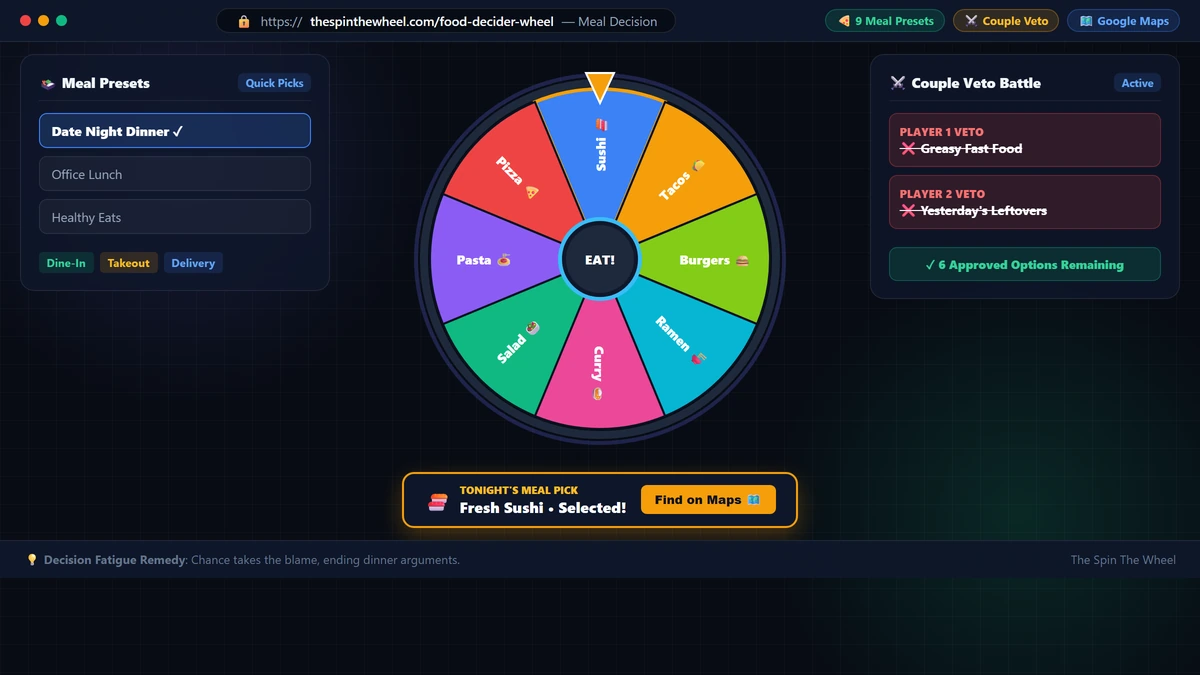
Few questions trigger more dinner stalemates or delivery app doom-scrolling than “What do you want to eat?” When you’re hungry and tired after a long day, picking between twenty menus feels like a second job. The Food Decider Wheel makes that choice instant and fun. Spin through 9 curated meal presets, filter out dealbreakers, challenge your partner to a quick veto game, or let pure chance pick your next meal.
Why Choosing What to Eat is So Exhausting (And How a Wheel Breaks the Loop)
From grabbing breakfast on the run to coordinating a team lunch or dinner with family, everyday meals require constant tradeoffs. By 6:00 PM, your willpower is tapped out—a familiar burnout known as decision fatigue.
Open a food delivery app with 300+ listings, and your brain hits another wall: Menu Fatigue. You scroll endlessly through review stars, delivery fees, and conflicting cravings until you’re too tired to care. Letting a random wheel make the first move breaks the analysis paralysis, giving you a clear direction in seconds so you can skip straight to eating.
Behavioral research reveals a simple truth: handing small decisions to an outside tool—like a wheel or coin flip—cuts out post-decision regret. If a restaurant turns out to be mediocre, nobody blames themselves or each other. Chance took the responsibility, letting you enjoy dinner without second-guessing.
Delivery apps often promote restaurants that pay the highest advertising fee. TheSpinTheWheel has zero ad deals, no sponsor ranking boost, and no hidden weighting. Every option on your wheel has the exact same mathematical odds of winning.
The 3 Golden Rules: Eliminating Mealtime Decision Fatigue
Ever spin a food wheel with someone only to hear: “No, not that! Spin again!”? That happens when people don’t agree on ground rules before hitting the button. Keep things fun and fast with these 3 straightforward rules:
Clean the list before spinning. Remove closed places, foods that trigger allergies, or meals someone just ate yesterday. The wheel should only hold dishes everyone can actually eat.
Each person gets exactly one veto. If you use it, the next spin is final. Having a hard limit stops people from respining indefinitely until they get their personal favorite.
Whoever compromises on dinner gets first pick on the next decision—like choosing dessert, picking the movie, or choosing lunch tomorrow. Keep things balanced and everyone stays happy.
Danish poet and scientist Piet Hein noticed an interesting quirk in human psychology: when you flip a coin to decide between two choices, you don’t necessarily do what it says. Instead, while the coin is in the air, you suddenly realize what you were secretly hoping for all along.
Just like flipping a coin or using a yes or no wheel, this tool acts as an instant gut-check. If it lands on “Tacos” and your stomach sinks, that is useful data—you secretly wanted Thai food. Tap “Dislike or Closed? Veto & Respin” (powered by our elimination wheel engine) to drop Tacos from the wheel and spin again with total confidence.
The 60-Second Veto Game for Couples & Office Teams
The most frustrating phrase in meal planning is: “I don’t care, whatever you want”—always followed ten minutes later by: “No, definitely not that.” When you’re hungry, it’s much easier to name what you don’t want than agree on a single favorite dish.
Our Couple Battle Mode brings the popular “5-2-1 veto rule” from social discussions into a quick, interactive game:
Player 1 taps up to 2 meals they cannot stomach tonight. Those options disappear immediately.
Player 2 taps up to 2 dealbreakers from what’s left. No arguments, just clean elimination.
The wheel drops every vetoed dish and re-weights only the meals both of you accept. One final spin decides dinner!
Dine Out, Order Delivery, or Cook at Home: How to Decide in 10 Seconds
Often the real question isn’t just what cuisine you want, but how much effort you’re willing to put in. When you can’t decide between getting dressed, ordering delivery, or opening the fridge, use this quick guide:
| Dining Style | Energy Level | Time to Table | Budget | Best For |
|---|---|---|---|---|
| 🍽️ Dine-In (Sit-Down) | High (Ready to head out) | 45–90 Mins | $$$ ($15–$45+) | Date nights, catching up with friends, and zero kitchen cleanup. |
| 🛵 Takeout / Delivery | Low (Staying in comfy clothes) | 30–45 Mins | $$ ($10–$25) | Tired workdays, movie marathons, and rainy evenings. |
| 🍳 15-Min Home Cook | Medium (Quick prep) | 15–20 Mins | $ ($2–$8) | Budget-friendly, healthy eating, and using up pantry staples. |
Most online wheels just print text on a screen. Here, winning actually moves you toward dinner:
- 📍 1-Click Google Maps: Tap “Find Near Me” to open Google Maps for your area, showing open restaurants, reviews, and walking or driving routes.
- 🛵 Fast Delivery Links: Jump straight into DoorDash or Uber Eats pre-filtered for that winning cuisine.
- 🍳 15-Minute Recipe Card: Tap “Cook at Home Idea” for a quick recipe and an ingredients checklist you can copy to your phone in one click.
If you want to save money and find yourself staring blankly into an open fridge, grab three simple things:
- 1 Base Carb: Cooked rice, dry pasta, ramen noodles, or flour tortillas.
- 1 Protein: 2 eggs, a can of beans, leftover chicken, or diced tofu.
- 1 Veggie & Sauce: Frozen peas or broccoli, onions, cheese, butter, or soy sauce.
Paste those ingredients into the Active Dishes box and spin for the cooking style: Crispy Fried Rice, 10-Minute Frittata, Garlic Aglio e Olio, or a Cheesy Quesadilla!
Zero Pop-Up Ads, Zero Sponsored Bias: Why This Wheel is Different
Many online spinners are cluttered with flashing banner ads, and food apps quietly rank paying restaurants higher. Here is how TheSpinTheWheel is designed specifically for people who just want a fast, unbiased answer:
| Feature & Metric | The Spin The Wheel | Wheel of Names | Picker Wheel | Wheel Decide |
|---|---|---|---|---|
| Dedicated Physical URL | Yes (/food-decider-wheel) | Wheel of Names (Generic Homepage) | Picker Wheel (/food-picker-wheel) | Wheel Decide (/wheel-of-dinner) |
| Cuisine & Mood Presets | 9 Presets (Breakfast, Lunch, Late Night...) | None (Manual Typing) | Basic Categories | 1 Generic List |
| Couple Veto Battle Mode | Yes (Turn-based 2-Player Veto) | No | No | No |
| 1-Click Google Maps Handoff | Yes (Instant “Near Me” Search) | No | No | No |
| Gut-Check Veto & Respin | Yes (Automatic Discard & Respin) | No | No | No |
| Fair Randomness Engine | Hardware CSPRNG (crypto.getRandomValues) | Hardware CSPRNG (crypto.getRandomValues) | Pseudo-random Math.random() | Server-side PRNG |
| Mobile-First Touch & Audio | Yes (Haptic Ticks + Confetti) | Basic Audio | Sound Effects | No Sound |
| Intrusive Banner Ads | Zero Pop-Ups (Clean) | Minimal Ads | Multiple Display Ads | Heavy Banner Clutter |
Frequently Asked Questions (FAQ)
How does the Food Decider Wheel choose what to eat? +
The Food Decider Wheel uses the browser’s built-in cryptographic random number generation (window.crypto.getRandomValues) to ensure true fairness. Unlike food apps that sort dishes to promote paid partners, every option on your wheel has an exact, equal chance of winning with zero ads and zero biased streaks.
What should we do if both partners dislike the winning dish? +
Follow Rule 2 (The One-Veto Rule): click “Dislike or Closed? Veto & Respin” in the winner popup to remove that meal from the wheel and spin again. Or switch to Couple Battle Mode before spinning so both people can eliminate their top two dealbreakers in advance.
How do the cuisine and dietary filters work? +
Clicking any mood preset (like Breakfast, Office Lunch, Healthy, or Late Night) instantly loads a curated list of dishes. Toggling dietary filters like Vegetarian, No Pork, Gluten-Conscious, High-Protein, or Under 500 kcal immediately hides dishes that don’t fit—no page reloads needed.
Can I find nearby restaurants directly after spinning? +
Yes. Once the wheel lands on a dish (like Sushi or Tacos), the winner card displays a 1-click “Find Near Me” button. It opens Google Maps centered on your area, showing top-rated local spots, customer reviews, opening hours, and walking or driving routes.
Can I customize the wheel with my own neighborhood restaurants? +
Yes. Open the “Active Dishes On Wheel” box in the side panel, type or paste your favorite spots or pantry ingredients (one per line), and click Update Wheel. You can also click Share to create a shareable link to send to your group.