Multi-Wheel Spinner: Spin 2 or 3 Custom Wheels at Once
Real-world dilemmas rarely have just one moving part. Whether you are assigning household chores, pairing students with reading tasks, or hosting a party game, decisions connect who does it, what they must do, and what rules or deadlines apply. Running multiple synchronized wheels side by side settles every dimension at once—fairly, openly, and without awkward debates.
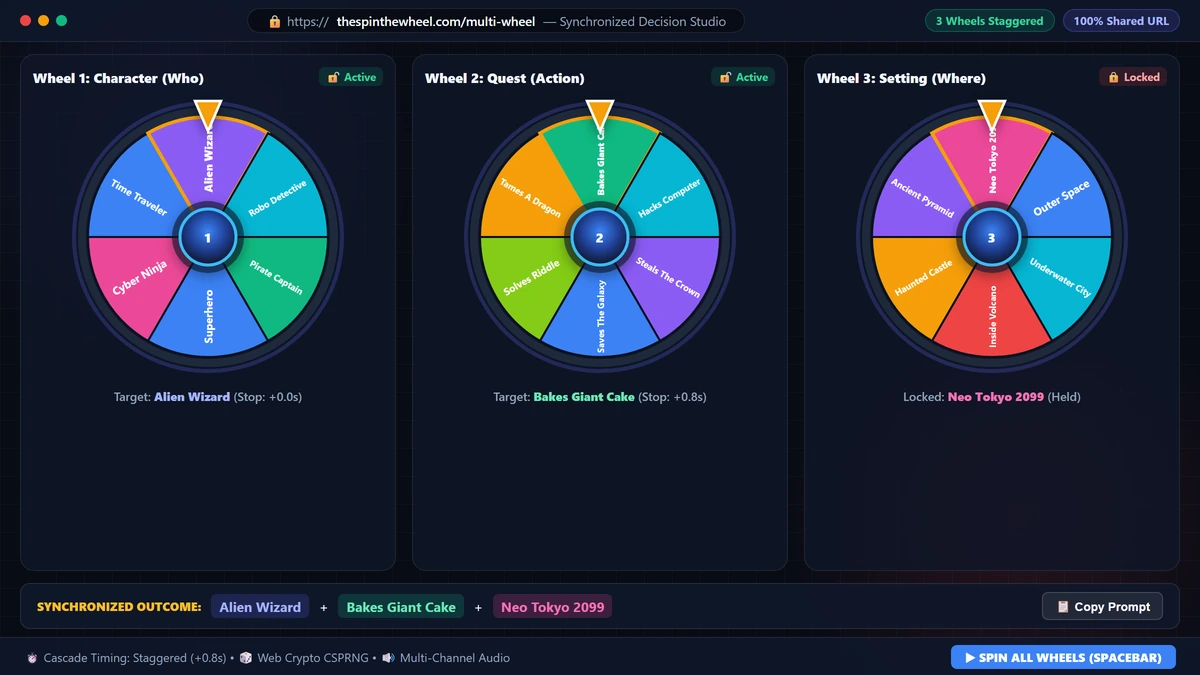
1. Why Spin 2 or 3 Wheels Together Instead of One Wheel Multiple Times?
In cognitive psychology and behavioral economics, Multi-Attribute Utility Theory (MAUT) reveals that when a decision involves multiple independent variables, human decision fatigue multiplies exponentially. When a group or classroom must resolve a compound question—such as picking which team member presents, what topic they cover, and their time limit—trying to negotiate all three parts simultaneously leads to collective analysis paralysis.
A standard traditional single-variable spinner can only select one discrete item per spin. Resolving a 3-variable dilemma using a single wheel forces two frustrating compromises:
- Pre-multiplying every possible combo: Suppose you have 8 people, 6 tasks, and 6 deadlines across three wheels. Fitting every combination onto one wheel requires 288 separate slices (8 × 6 × 6 = 288). Each slice shrinks into a tiny sliver under 1.25 degrees, making the text unreadable on phones and laptops.
- Spinning one wheel three times sequentially: Spinning once, writing the name on paper, swapping the list, spinning for the task, and spinning again for the deadline kills group momentum. It wastes time and invites suspicion that the host manually steered the outcome.
By keeping three independent, orthogonal wheels (W1, W2, W3) on one screen, the total possibility space is calculated cleanly:
Because each wheel spins on an independent cryptographic random seed, the joint probability remains strictly unbiased:
This mathematical independence dismantles Correlation Bias: no participant can claim the host or teacher subtly paired an unpleasant task with someone they dislike.
2. Why Do the Wheels Stop One by One? Suspense Timing and Instant Combo Stories
If two or three spinning wheels were to stop at the exact same millisecond (t = 0), your eyes would not know where to look. Because human central vision can only focus on one focal point at a time, halting all wheels simultaneously creates visual confusion, and the dramatic narrative of the moment is lost.
To solve this, TheSpinTheWheel uses Suspense Cascade Deceleration—a calibrated 3-beat rhythm engineered to direct group attention step by step:
- Beat 1 (The Subject, 3.8s): The audience discovers who was selected (e.g., "David"). All group attention locks onto David, while the remaining wheels continue spinning rapidly.
- Beat 2 (The Action, 4.6s): 800 milliseconds later, Wheel 2 reveals the assignment (e.g., "Imitate a chicken"). Anticipation peaks as everyone wonders under what conditions David must do it.
- Beat 3 (The Climax, 5.5s): 900 milliseconds later, Wheel 3 lands on the rule or penalty (e.g., "While wearing oven mitts"). The tension releases in shared laughter and entertainment.
The instant Wheel 3 stops, our client-side syntactic engine compiles the results into a Compound Combo Story. Instead of three separate popups cluttering your screen, the app displays one grammatically clean sentence with a 1-click Copy Story button formatted to paste directly into Slack, Zoom, or your group chat.
3. The Consensus Anchor Protocol: Resolving Multiparty Impasses
In multiparty decision engineering—whether roommates distributing domestic duties, agile teams assigning sprint retrospectives, or couples planning weekend itineraries—pure random chance occasionally produces an outcome that captures 80% alignment but introduces a single operational friction point.
Suppose a multi-wheel assignment generates: "Alex" + "Scrub the Bathroom" + "Before 8:00 PM Tonight". Alex readily accepts task responsibility, but an evening schedule prevents the assigned timeframe. Conventional multi-wheel utilities force a total reset, discarding hard-won alignment and triggering negotiation fatigue.
TheSpinTheWheel operationalizes decision psychology through the Consensus Anchor Framework:
- Phase 1 (Consensus Anchoring): Secure agreed-upon dimensions immediately. Freezing approved outcome coordinates locks task ownership and assignee identity into an immutable state, eliminating backwards debate.
- Phase 2 (Targeted Friction Re-Resolution): Re-engage randomization exclusively across the contested parameter (e.g., adjusting the completion window to "Tomorrow morning before shift") without destabilizing established agreements.
This independent state-locking mechanism turns multi-dimensional spinning from a blunt novelty into an advanced behavioral negotiation instrument.
4. The Unequal List Problem: How to Pair 30 People with 5 Tasks Fairly
The most frequent challenge teachers and hosts encounter when using multi-wheel spinners is unbalanced lists: for example, a classroom with 30 student names on Wheel 1, but only 5 presentation topics on Wheel 2.
Mathematically, this creates a 30:5 (or 6:1) ratio. To prevent duplicate topics or unassigned students during classroom turn selection or team assignments with a random group generator, use one of two battle-tested approaches:
- Method A: Sampling with Replacement (Balanced Coverage): Let Wheel 2 cycle naturally without deleting items. Over 30 spins, each of the 5 topics will be selected approximately 6 times. This ensures every student gets a topic, and all topics receive equal representation across the classroom.
- Method B: Dynamic Elimination (One Task per Person): If each question or prize can only be awarded once, delete the selected item from Wheel 2's configuration tab after each spin while leaving Wheel 1 intact. Wheel 2 dynamically recalculates its slice angles, keeping remaining items 100% uniform in probability.
5. Multi-Wheel vs Single Wheel vs Spreadsheets: Which Should You Use?
Choosing the right tool depends on how many variables you need to decide and the social setting of your activity:
| Decision Method | Setup Overhead | Audience Suspense & Energy | Multi-Variable Handling | Selective Locking |
|---|---|---|---|---|
| Single Wheel / Binary Coin Flip (Simpler alternative) |
Low (1 list) | Low (Fragmented across multiple rounds) | Poor (Requires manually recording each intermediate step) | None (Must reload or switch lists) |
| Multi-Wheel Spinner (This Dedicated Tool) |
Zero Friction (1-click presets or custom tabs) | Maximum (Staggered stops + audio fanfare) | Native 2-in-1 & 3-in-1 simultaneous resolution | 1-Click Independent Wheel Pinning |
| Matrix Spreadsheet / Decision App (Complex alternative) |
High (Formulas, row/col setup, sign-ins) | Zero (Clinical calculations destroy social fun) | High (Complex multi-criteria formulas) | Manual cell locking and formula overrides |
6. How Does TheSpinTheWheel Compare to Wheel of Names and SpinTheWheel.io?
How does our simultaneous multi-wheel architecture compare against alternative multi-wheel tools? For a deeper look at core platform differences, check our in-depth Wheel of Names alternatives review.
| Feature & Performance Metric | TheSpinTheWheel (/multi-wheel) | Wheel of Names (Add Wheel) | SpinTheWheel.io (Multi-Mode) |
|---|---|---|---|
| Rendering Engine & Smoothness | 60 FPS Canvas 2D (<12KB bundle, zero lag) | ~45 FPS (Heavy multi-element DOM overhead) | <20 FPS (Severe stutter with 3+ wheels) |
| Result Announcement | Automatic unified grammar-aware combo card | None (Multiple popup dialogs collide and overlap) | None (Raw disconnected outcome list) |
| Stopping Mechanics | Suspense Cascade (3.8s, 4.6s, 5.5s staggered) | Abrupt simultaneous stop (Causes visual confusion) | Irregular stuttering lag without theatrical pacing |
| Selective Wheel Locking during "Spin All" | 1-Click Lock/Pin keeps chosen wheels frozen while "Spin All" rotates the rest | No lock feature (Must click remaining wheels manually one by one) | No lock feature (Must click remaining wheels manually one by one) |
| Mobile Viewport Experience | Adaptive Stack + Sticky Bottom Spin Button | Wheels shrink to ≤140px (Text truncated) | Horizontal overflow and broken container layout |
7. Frequently Asked Questions About Multi-Wheel Spinning
How does Multi-Wheel handle unequal list sizes, such as 30 students versus 5 quiz questions?
Multi-Wheel treats each wheel as an independent probability space. When Wheel 1 contains 30 student names and Wheel 2 contains 5 questions, each wheel computes its own uniform slice angles independently (12° per student, 60° per question). You can either allow questions to cycle with replacement across all 30 students, or manually delete each asked question from Wheel 2's list to perform sampling without replacement. Both methods maintain full COPPA and FERPA privacy compliance.
What is Suspense Cascade Deceleration and why are the stops staggered?
If 2 or 3 wheels stop at the exact same millisecond, viewers experience cognitive overload because human foveal vision cannot focus on multiple focal points simultaneously. Our Suspense Cascade algorithm staggers rotation curves: Wheel 1 stops at 3.8s (revealing the person), Wheel 2 at 4.6s (revealing the task), and Wheel 3 at 5.5s (revealing the constraint). This 3-beat rhythm builds theatrical suspense and mirrors classical storytelling timing.
Can I lock one wheel's result and only re-spin the remaining wheels?
Yes. Each wheel header contains an independent Lock button (with a lock icon). When activated, that wheel is frozen at its current winning slice with an amber status badge. When you click "SPIN ALL WHEELS", the locked wheel remains completely stationary while the unlocked wheels rotate to generate new complementary choices.
How does the Compound Combo Story generator synthesize results into a coherent sentence?
Upon completion of the final wheel's rotation, our client-side grammar synthesizer extracts the winning label from each active wheel and injects them into an active template formula (e.g., {Who} is assigned to {Action} before {Deadline}!). The resulting synthesized sentence is rendered in the Glassmorphic Combo Card with a 1-click "Copy Story" button formatted for instant posting to Slack, Zoom, or team chat.
Can I control individual wheels using keyboard shortcuts during a live presentation?
Yes! Pressing the Spacebar triggers "SPIN ALL WHEELS" for all unlocked wheels. You can also press numeric keys 1, 2, or 3 on your keyboard to spin Wheel 1, Wheel 2, or Wheel 3 individually, giving the presenter fluid control without mouse precision.