The 60-Second Silence Tax: Cognitive Friction in Distributed Sprints
In distributed software teams operating across Zoom, Microsoft Teams, and Google Meet, the opening sixty seconds of any virtual meeting exact an invisible yet heavy tax on productivity. When attendees join a digital call, they do not arrive in a vacuum. Engineers transition abruptly from intense deep-work compiler debugging; product managers shift away from contentious roadmapping threads; designers close complex visual canvases. The immediate result is cognitive friction: cameras switch on, microphones remain rigidly muted, and participants default to defensive silence while waiting for someone else to initiate contact.
In group behavioral psychology, this hesitation represents the classic Mute Button Prisoner's Dilemma. Unmuting one's microphone in an open room carries immediate perceived social risk: speaking over a colleague, sounding unpolished, or making a comment that lands awkwardly in a cold room. As a consequence, distributed teams without intentional facilitation succumb to asymmetric conversation patterns where only the highest-paid person (the HiPPO) or dominant extroverts fill the vacuum.
In landmark research conducted at Harvard Business School by Dr. Amy Edmondson and corroborated by Google's five-year Project Aristotle study on high-performing teams, conversational turn-taking equity was identified as the single strongest statistical predictor of team psychological safety, defect reporting speed, and sprint velocity. When all members speak within the first five minutes of a working session, subsequent technical debate becomes 47% more egalitarian, directly dismantling hierarchical fear.
De-escalating Social Risk: Why Randomization Outperforms Manual Facilitation
Traditional team warmups typically fail because of evaluative social pressure. When a Scrum Master or project manager asks a pointed question directly to an individual ("Sarah, how are you feeling about the sprint deadline?"), the question acts as an interrogation. The recipient immediately experiences a surge in cognitive load: analyzing what the manager wants to hear, filtering for vulnerability risks, and calculating political repercussions within the corporate hierarchy.
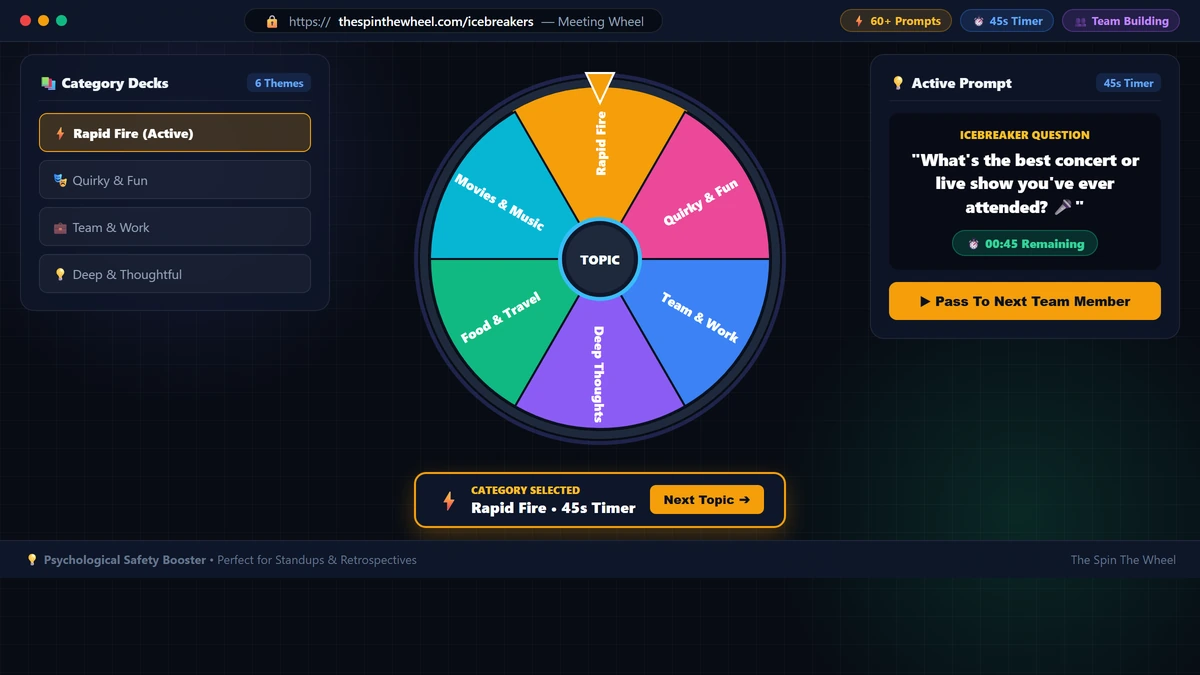
The Zoom Meeting Icebreakers Wheel radically alters this psychological dynamic by acting as an impartial, external arbiter. When conversational prompts are selected by a hardware-accelerated randomizer powered by the Web Cryptography API, the social responsibility of the question shifts entirely from the facilitator to the algorithm. The question is no longer an evaluative critique; it is a neutral gamified event.
Furthermore, randomized prompt selection prevents turn-taking queue dread. When managers announce a rigid around-the-room sequence ("Let's go down the Zoom participant list alphabetically"), team members do not listen to their peers. Instead, they mentally rehearse their own upcoming statement, fixating on their own performance until their turn has passed. By introducing playful unpredictability combined with low-stakes prompts, the wheel keeps team attention actively focused on the collective moment.
The Three-Tier Facilitation Matrix: Comparing Meeting Warmup Solutions
To understand why dedicated lightweight browser spinners achieve superior outcomes in remote agile environments, compare the three predominant methods used by engineering organizations:
| Evaluation Metric | Manual Round-Robin ("Go Around") | TheSpinTheWheel Icebreakers | Heavy Polling Apps (Kahoot / Slido) |
|---|---|---|---|
| Setup & Time to First Voice | Zero software setup, but high hesitation delay (1-2 mins of silence). | Immediate: Open browser tab, share screen, spin within 5 seconds. | Slow: Requires organizer login, room PIN generation, and QR scan. |
| Device & Context Switching | None, but high conversational pressure on introverted engineers. | Zero device switching: Participants watch the host's screen share directly. | High friction: Attendees must unlock smartphones or switch browser windows. |
| Turn-Taking Queue Dread | Severe: Participants mentally rehearse answers instead of listening. | Eliminated: Unpredictable spins keep everyone present and amused. | Medium: Gamified trivia leaderboards induce competitive performance stress. |
| Enterprise Security & PII | N/A (Verbal communication only). | 100% Client-Side: Zero employee names or answers sent to servers. | Third-party SaaS data storage, user accounts, and telemetry tracking. |
| Screen-Share Fluidity (60 FPS) | None (Camera grid only). | Optimized HTML5 Canvas: Crisp 60 FPS rotation across Zoom / Meet / Teams. | Heavy animations and background music can saturate video codecs. |
| Meeting Agenda Protection | Poor: Extroverts frequently monologue, burning 15+ minutes. | Strict: Built-in 30s Rapid Timer enforces concise 4-minute total warmups. | Variable: Quizzes frequently overrun standup timeboxes. |
Actionable Facilitator Techniques for Agile Coaches & Engineering Leads
Effective remote facilitation requires balancing playfulness with structural discipline. To maximize engagement while rigorously protecting your sprint agenda, apply these four proven facilitator protocols:
1. The 30-Second Rapid-Fire Boundary
The most common reason remote engineering managers avoid icebreakers is fear of meeting derailment. When an open-ended question is posed without constraints, a single vocal teammate can turn a brief warmup into a ten-minute monologue about their weekend gardening project.
Use our built-in Response Timer Widget located directly below the wheel. Set the clock to 30 or 45 seconds before launching the spin. Announce the rule clearly: "We have thirty seconds per person to share our quick answer before moving to the next teammate." The visual countdown creates a healthy, collective boundary that encourages spontaneity while assuring the team that the core technical discussion will start punctually.
2. The "Pass or Play" Grace Rule
Forced vulnerability is the antithesis of genuine psychological safety. In any team, members experience fluctuating energy levels, intense personal stress, or social anxiety. Forcing an introverted junior developer into the spotlight under threat of embarrassment destroys trust.
Always establish the Pass or Play Rule: any teammate whose turn is drawn has the sovereign right to say "Pass today!" with zero follow-up questions, zero teasing, and zero social friction. Paradoxically, knowing they have an unconditional exit door makes team members significantly more willing to participate voluntarily.
3. Context-Specific Category Deck Sequencing
Different agile ceremonies demand distinct conversational frequencies. Spinning a wacky party prompt during a tense incident postmortem will alienate participants, just as asking heavy philosophical questions during a Monday morning standup drains mental energy. Tailor your deck selection to the ceremony:
- Quick Standup (2 Min): Best for daily morning standups, sprint kickoff syncs, and cross-team alignments. Focuses on energizing habits, small wins, and low-friction preferences.
- Fun & Quirky: Ideal for Friday afternoon check-ins, remote happy hours, virtual holiday mixers, and social team-building hours. Introduces lighthearted humor that dissolves corporate stiffness.
- Team Deep Dive: Tailored for bi-weekly sprint retrospectives, project milestone completions, and quarterly offsites. Examines mentorship, resilience, personal values, and creative flow states.
- Workplace Culture: Designed for process optimization workshops, tooling critiques, and remote working habit alignments. Focuses on meeting hygiene, asynchronous workflows, and focus recovery.
4. Hardware-Accelerated Screen Share Setup
To deliver an engaging broadcast experience in virtual conferencing tools, follow these technical best practices:
- Share Window, Not Entire Desktop: In Zoom or Teams, select Share Window → Browser Window to prevent accidental notifications or Slack popups from interrupting the team.
- Activate Fullscreen Mode: Click the Fullscreen toolbar button or press F11 to expand the canvas, eliminating browser tab clutter.
- Pair with Team Sequencing Tools: If your team wants to decide who speaks next in addition to what question they answer, combine this tool with our Team Picker Wheel for fair group distribution or the Classroom Name Picker for sequential participant elimination.