Twitch Subathon and Stream Wheel Ideas: Battle-Tested Challenges, Pacing, and Rules
A good stream wheel keeps chat entertained without exhausting the creator or triggering a Twitch strike. Setting round limits, scheduling moderator vetoes, and tuning slice probabilities turns viewer spins into genuine broadcast highlights rather than chaotic interruptions.
📑 Jump to Section Tap to Expand ▼
60 Battle-Tested Stream Wheel Ideas by Broadcast Category
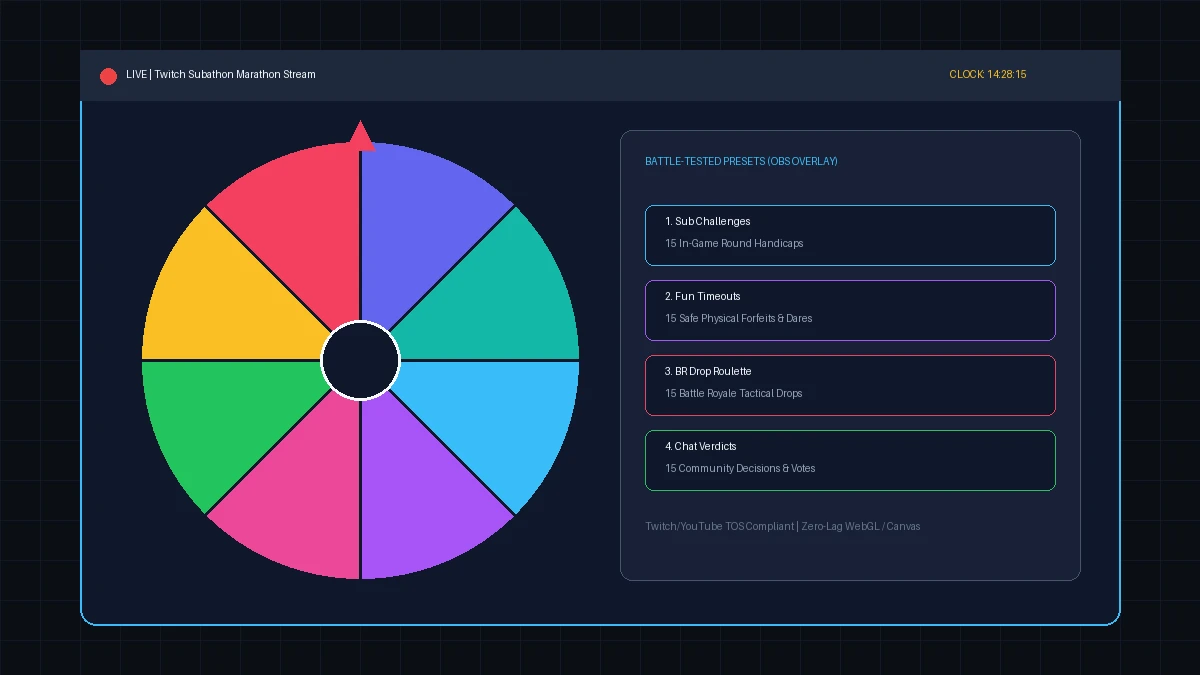
Livestream wheels work best when each slice has a clear time limit and simple completion rules. Round-based penalties build instant suspense and end cleanly before the next match starts.
💡 Streamer Rule: Cap Each Wheel at 15 Slices
You do not need a wheel packed with dozens of chaotic dares. Experienced streamers stick to a focused list of 8 to 15 tested handicaps per category. A lean wheel keeps energy high, speeds up spins, and prevents awkward broadcast dead air while looking up rules.
To save stream prep time, the sixty prompts below are grouped into four ready-to-use presets inside the OBS Wheel Overlay. Every challenge specifies an exact time limit and adapts easily for webcam streams, faceless creators, and VTubers.
1. In-Game Gameplay Handicaps (FPS, Battle Royale & MOBA)
⚡ Launch In-Game Handicaps PresetThese in-game handicaps alter controls, audio, or weapon choices without throwing the match:
2. Creative & Social Media Chaos (High-Engagement, Zero-Fatigue)
⚡ Launch Creative & Social PresetWhen you need a break from sweaty matches, these social and creative dares give chat funny clips without wearing you out:
3. Fun Timeouts & Physical Stream Forfeits (With VTuber Adaptations)
⚡ Launch Fun Timeouts PresetPhysical forfeits offer quick comedic relief between queues while protecting stamina (VTubers and faceless streamers can use the avatar and audio options):
4. Subathon Clock Modifiers & Community Verdicts
⚡ Launch Subathon Clock PresetUse these community slices during uncapped subathons to let chat adjust countdown timers or make broadcast decisions:
If you currently capture a wheel window, check our OBS Wheel overlay to see how native browser transparency removes jagged green chroma edges.
How to Trigger and Price Your Wheel: Channel Points, Bits, and Subs
How you trigger the wheel matters just as much as what is on it. If you promise one spin per sub, a sudden 20-gift bomb during a hype train will grind your stream to a halt. Experienced broadcasters manage viewer redemptions with three practical setups:
Three Subathon Trigger Setups (Preventing Gift Bomb Chaos)
- Milestone and Hype Train Triggers: Spin only at cumulative goals (every 25 subs) or when chat reaches Hype Train Level 5. This celebrates donation spikes without pausing gameplay mid-fight.
- Two-Tier Wheel System: Separate minor gags from intense penalties across two wheels: a Light Wheel (500 Bits or Channel Points) for voice accents, and a Mega Wheel (5+ Subs) for spicy handicaps.
- Lobby Batching: Let moderators queue viewer redemptions during matches, then spin the wheel together between game rounds.
Pricing Channel Points vs. Real Money Subs and Bits
Under the Twitch Channel Points Acceptable Use Policy, loyalty points cannot be exchanged for cash sweepstakes or physical prize entries. Set redemption costs across three clear tiers:
- Channel Points (2,000 to 10,000 Points): Best for quick laughs, voice accents, hydration reminders, and chat verdicts.
- Bits and Tier 1 Subs (500 Bits or 1 Sub): Mapped to round-based handicaps, restricted weapon drops, and five-minute forfeits.
- Subathon Milestone Bounties (5+ Subs): Reserved for high-stakes spins containing Tier 3 penalties or countdown timer modifiers.
Channel Points must stay tied to in-stream entertainment. Raffling real-world items violates platform anti-gambling rules.
Subathon Clock Limits and Sleep Stream Rules (Preventing Burnout)
Marathon timers can easily spiral out of control. Without clear ground rules, you risk exhaustion and moderation strikes for unmonitored broadcasts:
- Daily Hard Cap Limits: Set a maximum clock cap (such as 24, 36, or 48 hours). Once reached, extra subs support charity goals or chat prizes instead of extending broadcast hours.
- 48-Hour Technical Stream Cutoff: Twitch caps single continuous broadcasts at 48 hours. When approaching 48 hours, schedule a quick two-minute restart to save your VOD without resetting the subathon timer.
- Sleep Stream Rules: When taking sleep breaks on camera, leave active moderators on duty or switch to an emote-only intermission screen so rogue chat messages or loud donation alerts do not trigger account penalties.
- Diminishing Time Per Sub: Lower added time as the stream progresses (such as +2 minutes per sub on Day 1, dropping to +1 minute after 20 hours).
Queue Throttling and Hotkey Control
Automated queue limits prevent alert collisions during high-traffic streams:
- Twitch Queue Cooldowns: Turn on global redemption cooldowns in the Twitch Creator Dashboard, limiting wheel spins to once every three to five minutes.
- Stream Deck Hotkeys: Map spins to a Stream Deck key or spacebar inside the OBS control deck. If you are tired of OAuth session drops with alert widgets, review our guide to Streamlabs Spin Wheel alternatives for zero-login overlays.
Marathon Pacing Math: Slice Weighting, Safeguards, and Moderator Veto Rules
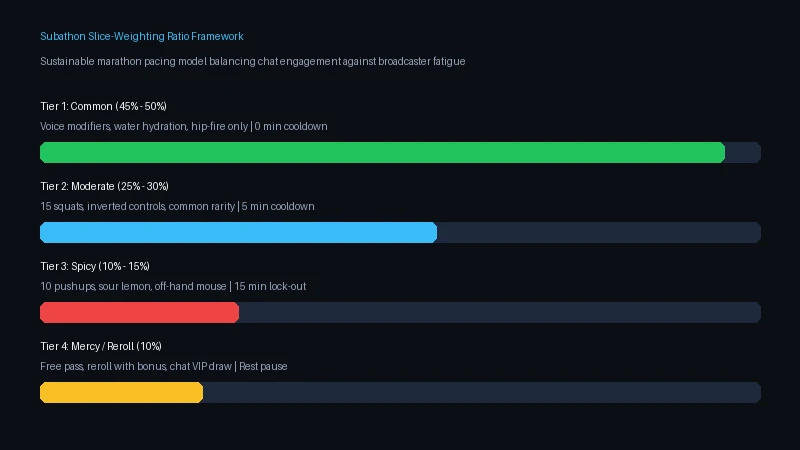
Marathons require realistic odds. Giving heavy physical forfeits the same slice size as mild voice gags leads to quick burnout. Setting custom slice weights on the Weighted Wheel Spinner keeps chat guessing while protecting stamina.
Four-Tier Probability Model for Long Broadcasts (45-30-15-10 Ratio)
Long broadcasts stay engaging when outcomes follow a four-tier baseline, balancing interaction against fatigue:
| Severity Tier | Probability Share | Example Challenge Outcomes | Broadcaster Impact & Cooldown Rule |
|---|---|---|---|
| Common (Tier 1) | 45% to 50% | Voice modifiers, hydration, hip-fire only | Minimal fatigue; zero cooldown; repeatable. |
| Moderate (Tier 2) | 25% to 30% | 15 Squats, inverted controls, MS Paint | Mild physical strain; enforce 5-minute cooldown. |
| Spicy (Tier 3) | 10% to 15% | 10 Pushups, sour lemon, off-hand mouse | High fatigue; mandatory 15-minute global cooldown. |
| Mercy / Reroll (Tier 4) | 10% | Free pass, reroll with bonus, VIP draw | Celebratory pause; resets fatigue counters. |
Operational Standard: Recommended baseline slice distribution for multi-hour marathon broadcasts.
This ratio ensures three out of four spins land on light entertainment. Rare Tier 3 slices build suspense without exhausting the creator.
Five Streamer Safeguards: Cooldowns, Anti-Griefing, and the Moderator Veto
Broadcasters protect stamina and match integrity using five essential safeguards:
- Single-Spicy Lockout: Tier 3 dares trigger a 15-minute cooldown, defaulting new spicy spins to Tier 1 until recovery.
- No Stacking Exercises: Physical forfeits never stack. If chat rolls two workout dares back-to-back, convert the second spin to a hydration break or voice gag.
- Moderator Veto & Emergency Reroll: In high-stakes matches, moderators hold authority to postpone a handicap to the next lobby. Streamers also get two emergency rerolls per broadcast.
- Ranked Match Anti-Griefing Rule: Never run severe handicaps in competitive ranked matches. Defer penalties to unrated modes or lobby screens to avoid teammate griefing reports under game TOS.
- Emergency Rest Slices: Long broadcasts should include 15-minute rest slices that pause the countdown timer for meals and posture breaks.
Platform TOS Redlines: Keeping Your Punishment Wheel Stream-Safe
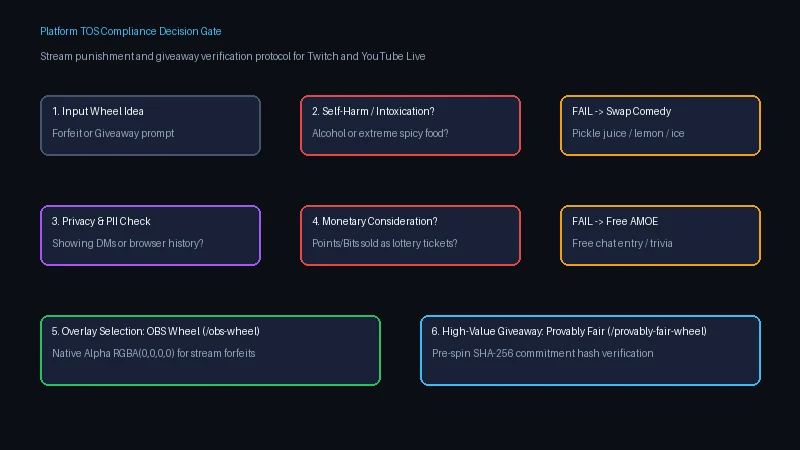
Punishment wheels must follow platform safety rules to prevent strikes or bans. The matrix below contrasts risky viral dares with stream-safe alternatives:
| Trigger or Challenge | Platform Policy Risk | Why It Flags Moderation | Stream-Safe Alternative |
|---|---|---|---|
| Alcohol Shots | Twitch Self-Destructive Behavior Policy | Dangerous impairment and self-destructive behavior. | Shot of pure lime juice or cold ice water. |
| Extreme Hot Sauce | Twitch Self-Destructive Stunts & Gags | Medical distress, physical vomiting, and respiratory distress. | Mild spicy chip or teaspoon of mild hot sauce. |
| Leaking DMs / History | Unauthorized Sharing of Private Info & Doxxing | Disclosing private messages or PII without consent. | Displaying desktop wallpaper or funny clip highlights. |
| Channel Point Cash Raffles | Twitch Channel Points Acceptable Use Policy | Prohibition against gambling and monetary exchanges. | Free community giveaways or channel VIP badges. |
| "Sub to Enter Giveaway" | YouTube Contest Policies & Guidelines | Forced consideration; artificial metric manipulation. | Free chat trivia entry with AMOE disclaimer. |
Compliance Reference: Official Twitch Community Guidelines & YouTube Contest Policies and Guidelines.
Prohibited Harmful Stunts and Stream-Safe Sensory Swaps
Twitch Community Guidelines ban self-harm, intoxication, and dangerous stunts. Replace alcohol shots or extreme hot sauces with sensory comedy. A slice of raw lemon or a teaspoon of pickle juice delivers genuine laughs without medical risks.
YouTube Contest Policies and Free Alternate Entry Requirements (AMOE)
Viewer giveaways on YouTube Live must follow YouTube Contest Policies and federal sweepstakes laws. Requiring viewers to subscribe or donate to enter is strictly prohibited:
- Free Alternative Method of Entry (AMOE): Giveaway entry must be completely free. Conditioning entries on paid memberships, Super Chats, or donations constitutes an unregulated lottery.
- Official Contest Rules: Streams must link official contest rules stating eligibility and disclaiming YouTube sponsorship.
💡 Entertainment Wheels vs. Viewer Giveaways
For stream forfeits, game handicaps, and drop loadouts, use the transparent OBS Wheel Overlay. If you are awarding high-value viewer hardware or gift cards, run the draw on the Provably Fair Giveaway Wheel so viewers can verify the outcome on the TheSpinTheWheel Audit Verifier.
Frequently Asked Questions
How do I embed a transparent wheel into OBS Studio or Streamlabs?
Add a Browser Source in OBS Studio pointing to https://thespinthewheel.com/obs-wheel?mode=overlay. It operates on native RGBA(0,0,0,0) Alpha transparency with zero Chroma Key edge fringing, under 15KB client-side code, and auto-dismissing winner banners (3s/5s/10s).
What is the difference between an entertainment wheel and a giveaway wheel?
Entertainment wheels handle broadcaster forfeits and handicaps directly on screen via the OBS Wheel Overlay. Viewer prize giveaways involve high-value hardware or gift cards and demand cryptographic transparency via the Provably Fair Giveaway Wheel with SHA-256 pre-spin commitment hashing.
How many slices should a subathon stream wheel have?
Veteran broadcasters recommend keeping wheels between 8 and 15 slices per category. Overcrowding wheels with 50+ unweighted options causes decision fatigue and stalls stream momentum.
Can VTubers and faceless streamers use punishment wheels?
Yes. VTubers and faceless streamers swap physical camera challenges with audio or avatar modifiers: voice changer accents, inverted model rigging, microphone muting for 2 minutes, or funny stream overlay stickers.
Can Twitch Channel Points be used to sell giveaway tickets?
No. The Twitch Channel Points Acceptable Use Policy strictly prohibits exchanging loyalty points for draws awarding items of real-world monetary value. Keep Channel Points strictly tied to in-stream gags, voice modifiers, and chat verdicts.